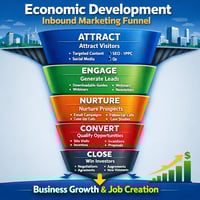
HubSpot marketing campaigns give economic development organizations one place to coordinate,...
HubSpot Email Templates for Economic Developers
Why economic developers need reusable HubSpot email templates
HubSpot email templates for economic development are reusable one-to-one messages that live in your CRM, pull in contact and company data automatically, and give staff a fast, consistent way to handle routine outreach without starting from a blank screen every time.
For most economic development teams, email is still where critical work happens: scheduling BRE visits, answering incentive questions, acknowledging RFIs, and nurturing investors. Yet those messages are often rewritten from scratch, buried in sent folders, or stored in personal drafts. That slows down response times and makes it hard to deliver a consistently high-quality experience.
HubSpot’s Sales Hub templates and snippets change that. They let you store your best one-to-one emails in a shared library, insert them in a click from Gmail, Outlook, or the HubSpot CRM, and personalize them instantly with tokens like Friend, , or {{deal.name}}. According to HubSpot research, companies that standardize follow-up processes and use built-in tools see significantly higher reply rates and faster cycle times compared with ad hoc outreach. You can explore these capabilities in more depth on HubSpot’s email templates overview.
For economic developers, the benefits are practical and immediate. Instead of debating how to phrase a BRE meeting request, staff can click a shared template, add one or two community-specific details, and send in under a minute. That time savings compounds over hundreds of interactions each year, freeing your team to do more strategic work—like designing new programs or meeting with employers face to face.
Templates also reduce risk. When the same structure is used across the team, you know that every RFI acknowledgment sets clear expectations, every compliance reminder includes the correct deadline, and every investor renewal email reflects your brand voice. That consistency matters when you’re stewarding public dollars, sensitive projects, and high-visibility company relationships.
Finally, templates make onboarding kinder and more human. New staff often worry about “saying the wrong thing” to a major employer or investor. With tested language built into HubSpot, they can focus on listening and following through, not drafting from scratch.
Core template types every economic development team should build
The most effective HubSpot email templates for economic developers form a compact, shared library that maps directly to your core workflows: BRE, business attraction, incentives, investors, events, and partner engagement. Start with a small set of high-use templates, then iterate based on real-world feedback and metrics.
Begin with BRE outreach. A simple "BRE meeting request" template can include tokens for the contact’s first name, the company name, and the assigned BRE lead. For example: “I’m reaching out from to see whether has any upcoming needs—such as hiring, expansion, facility, or permitting.” Teams using a structured BRE email like this often report higher meeting acceptance because the purpose and time request are clear.
Next, add project-related templates. An "Expansion follow-up" email is perfect after an employer flags a workforce or permitting need; it can reference the specific issue, the project owner, and the next meeting date. A "Business attraction introduction" template helps you reach target companies or site selectors with a concise overview of your sector strengths and a link to a relevant asset page.
Incentives and compliance deserve their own set. An "Incentive inquiry follow-up" template should briefly explain eligibility, outline next steps, and include a link to the application form. A "Compliance reminder" template can safely carry high-stakes details—agreement name, reporting period, due date, and secure submission link—without staff retyping them every time. This minimizes errors and avoids awkward follow-ups to correct dates or links.
Do not forget relationship-building templates. "Investor/member renewal" emails keep your revenue engine healthy by prompting renewals and sponsorship discussions at the right time. "Event invitation" and "event follow-up" templates ensure that program announcements, webinars, and community events feel professional and timely, with consistent registration links and calls to action.
Finally, add utility messages such as a "Site-selector RFI acknowledgment" or a gentle "No response" check-in that reopens the door with a simple yes/no question. Economic Development CRM guidance emphasizes that these concise, repeatable emails prevent staff from starting from zero while still leaving room for project-specific notes. You can see that perspective reflected on Economic Development CRM’s 2026 CRM guide, which highlights templates as a core feature.
Governance, personalization, and folder structure for templates
To make HubSpot email templates for economic development work long term, you need light but clear governance: who owns the library, how templates are named, and how they connect to your broader playbooks and automation.
Start by defining a naming convention. Use prefixes that match your major workstreams—for example, "01 — Business Retention & Expansion" or "03 — Incentives, Grants & Compliance"—and then add a short, action-focused description such as "BRE | Meeting Request | Existing Employer" or "Incentives | Compliance Reminder." This helps staff quickly find the right template during a busy day.
Next, organize templates into folders aligned with those workstreams: BRE, business attraction and site selectors, incentives and compliance, sites and RFIs, investors and partners, events and programs, and internal handoffs. A clear folder structure keeps the library from becoming a junk drawer over time and mirrors the way your team already thinks about its work.
Personalization is where HubSpot shines. Use contact, company, deal, ticket, and sender tokens to fill in names, locations, and project details automatically, and always set fallback values so blank fields never create awkward lines like “Hi ,”. HubSpot’s documentation on personalization tokens explains how to add these safely; see HubSpot’s knowledge base article on tokens for specifics.
Balance standardization with human nuance. Require that senders add one or two custom sentences—a recent news mention, a reference to a past visit, or a specific local asset—before sending. Short snippets are perfect for these reusable inserts. This keeps your outreach kind, contextual, and genuinely supportive rather than robotic.
Finally, connect templates to a documented follow-up playbook. Each template should clearly signal the next step: create a task, enroll the contact in a sequence where appropriate, update the project record, or log the outcome. Over time, track opens, replies, and meeting rates so you can refine subject lines and calls to action. With this feedback loop, your HubSpot email templates stop being static documents and become a living system that quietly supports your community’s growth.